Apache Handlers in DirectAdmin allow you to control how specific file types (extensions) are processed on your website. They are commonly used to define which PHP version or script engine runs certain files.
What Are Apache Handlers?
Apache Handlers tell the web server how to handle specific file extensions.
For example, you can:
Run .php files with a specific PHP version
Execute .cgi or .pl scripts
Control how custom file types are processed
They are especially useful when you want to override the default server behavior for your domain.
When Should You Use Apache Handlers?
Use Apache Handlers if:
You want to assign a specific PHP version to your site
Your hosting provider requires handler configuration
You are running legacy scripts
You need custom script execution rules
How to Configure Apache Handlers in DirectAdmin
Step 1: Log in to DirectAdmin
Access your DirectAdmin dashboard using your hosting credentials.
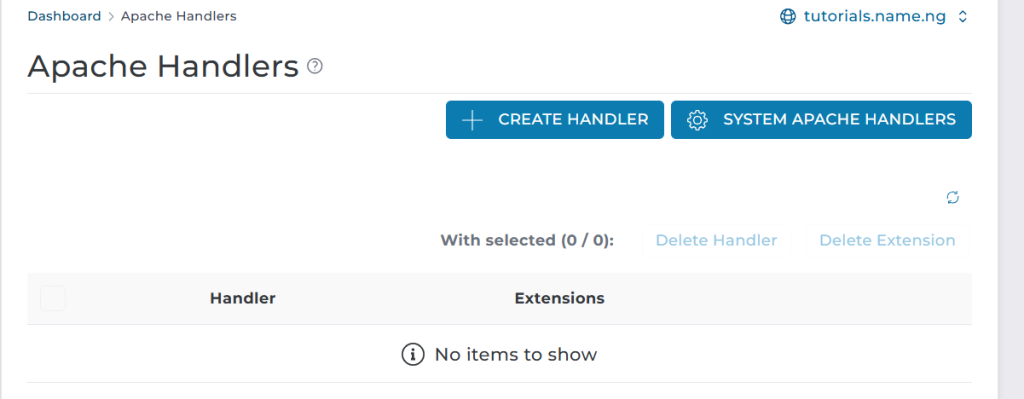
Step 2: Go to “Apache Handlers”
From the dashboard:
Click Advanced Features Select Apache Handlers
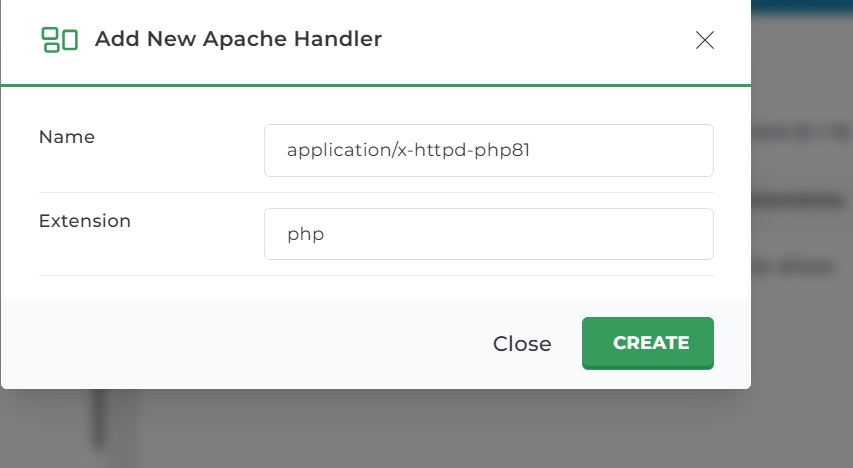
Step 3: Add a New Apache Handler
You will see a form to create a new handler.
Fill in the following:
Handler Name Example: application/x-httpd-php81
Extension Example: php
This tells the server which handler should process files with that extension.
Step 4: Save the Handler
Click Add or Save to apply the changes.
Your server will now process the specified file type using the chosen handler.
Common Apache Handler Examples
PHP Handler
Custom PHP Version (if supported)
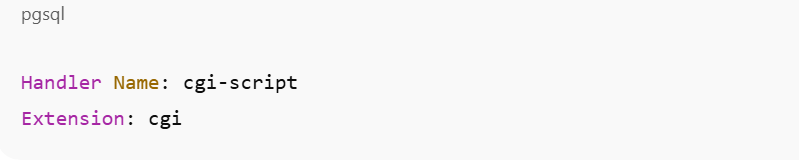
CGI Script
How to Remove or Edit a Handler
Go back to Apache Handlers
Locate the handler you want to change
Click Delete or Modify
Changes take effect immediately.
Important Notes
Incorrect handler settings can break your website.
Always confirm supported handlers with your hosting provider.
For PHP version changes, using PHP Version Selector is usually safer.
Apache Handlers are best for advanced users.
Summary
To configure Apache Handlers in DirectAdmin:
Log in
Go to Advanced Features → Apache Handlers
Enter handler name and file extension
Save changes
Apache Handlers give you fine-grained control over how your website processes files.