cPanel has a powerful feature that you can use to protect different directories on your server. This feature can be handy if you have multiple people accessing your cPanel, as you can password-protect the directories and folders you don’t want them to access.
What is directory privacy? Directory privacy is a feature in the cPanel that you can use to add additional security to your website and protect critical information and files by restricting access to specific directories on your server.
Steps to Setup Directory Privacy
Access cPanel: Log in to your hosting account and search for Directory Privacy (sometimes called Password Protect Directories) located within the Files section.
2. Select the Directory: Click the folder icon next to a directory to open it and navigate through your file structure. Click the name of the folder you want to secure.
3. Enable Protection:
Click the Edit button next to your desired directory.
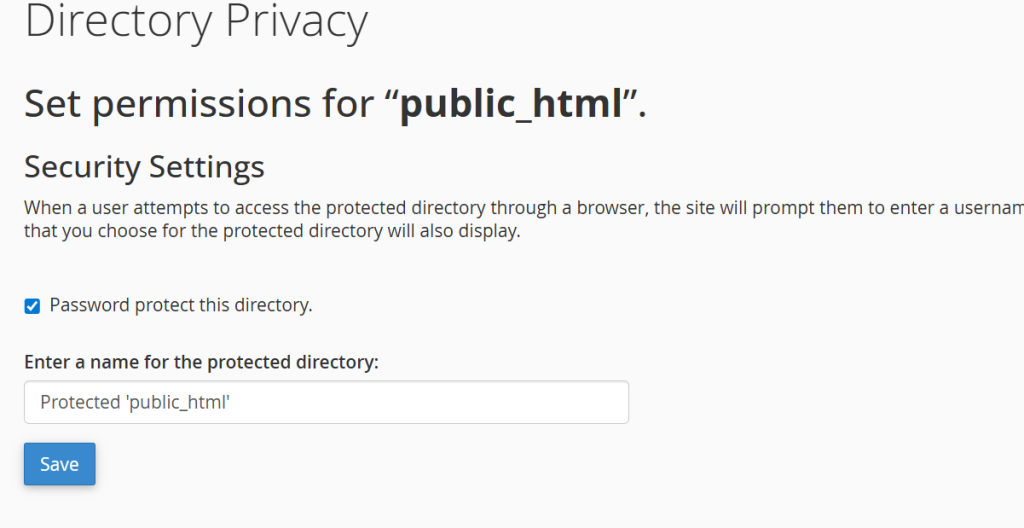
Check the box labeled Password protect this directory.
Enter a label in the Enter a name for the protected directory field. This name will appear on the pop-up prompt when visitors try to view the folder.
Click Save.
4. Create an Authorized User:
Click Go Back and scroll down to the Create User section.
Enter a new Username and Password (or generate a secure password).
Click Save.
Anyone attempting to access this folder or its subdirectories via a web browser will now be prompted to enter the designated username and password.
Additional Tips
Adding Multiple Users: You can repeat the “Create User” step to give different team members or clients their own login credentials.
Disabling Protection: To remove the password lock, simply go back to the directory, uncheck the Password protect this directory box, and click Save.
CMS Conflicts: If your directory holds a sub-application managed by a CMS (like WordPress), ensure the new .htaccess password rules do not conflict with the site’s existing rewrite rules
Tips for Better Directory Security
Use strong passwords for directory users to prevent unauthorized access.
Update credentials periodically or whenever an employee leaves your team.
Avoid protecting root folders like /public_html unless necessary.
Use SSL (HTTPS) to encrypt login credentials and prevent interception.
Combine directory protection with a Web Application Firewall (WAF) for enhanced security.